

Learn about your satellite for iPhone options to keep you safe when out of cell range.
Your Complete Guide to iPhone Satellite Features: SOS, Messaging, and Direct-to-Cell (2026)

 3 min read
As long as you have clear skies, your iPhone 14 or newer can connect with Globalstar satellites to keep you connected in case of emergency. | Image by iStock
As much as you may enjoy disconnecting when traveling off the grid, losing mobile signal entirely can be a point of anxiety and, oftentimes, dangerous. Fortunately, mobile dead zones are quickly becoming a thing of the past.
Starting with the iPhone 14 lineup, Apple revolutionized mobile safety by introducing built-in satellite connectivity. Originally launched as a basic Emergency SOS tool, Apple’s partnership with the Globalstar satellite network has steadily evolved. Thanks to recent iOS updates—particularly iOS 18—your iPhone is now a surprisingly capable satellite communicator, letting you text friends, request roadside help, and even tap into emerging carrier-provided direct-to-cell networks like Starlink.
What Can You Do with Apple’s Satellite Features?
If you have an iPhone 14 or later (any model) and are completely outside of traditional cellular and Wi-Fi coverage, your phone can connect directly to Globalstar satellites orbiting hundreds of miles above Earth.
With the latest iOS 18 software, Apple’s satellite suite now includes four main features:
-
Emergency SOS via satellite: The flagship feature. If you are injured or lost, this connects you directly to emergency dispatchers. You’ll be prompted to answer a few quick questions about your emergency, and the iPhone will securely transmit your encrypted text, medical ID, and location to responders.
-
Messages via satellite: You no longer need to be in an emergency to text from the wilderness. You can now message friends and family right from your standard Messages app. These iMessages are end-to-end encrypted and work seamlessly when you're off the grid.
-
Roadside Assistance via satellite: Got a flat tire on a remote dirt road? This feature connects you to a roadside assistance provider to get you a tow or a jumpstart, temporarily sharing your location with them until help arrives.
-
Find My via satellite: If you just want to let loved ones know you made it to your campsite safely, you can open the Find My app and update your location via satellite.
Are iPhone Satellite Features Free?
When Apple launched these features, they were included for free for 2 years following activation on any iPhone 14 or newer.
Apple has remained somewhat quiet on what the exact subscription cost will be once that initial two-year window fully expires for older devices. However, compared to dedicated satellite messengers like the Garmin inReach (which often require monthly subscriptions ranging from $12 to $50), Apple's built-in free period is an incredible value for casual adventurers.
How to Connect Your iPhone to a Satellite
Satellites move rapidly and have low bandwidth, so sending a text from the woods isn't as instantaneous as doing it from your living room. A message might take 30 seconds to send under a clear sky, or over a minute if you are under light tree cover.
To make this easier, Apple introduced the Connection Assistant in iOS 18. Here is how to use it:
-
Get a clear view: Step outside and ensure you have a clear view of the sky and horizon. Dense foliage, mountains, or tall canyons can block the signal.
-
Open the Connection Assistant: Swipe down from the top-right corner of your screen to open the Control Center, tap the Cellular button, then tap Satellite. (You can also find this in your Settings app).
-
Follow the prompts: Your iPhone will display an onscreen guide, telling you exactly where to point your phone to lock onto the nearest moving satellite. You don't need to raise your arm to the sky—just hold it naturally and turn left or right as directed.
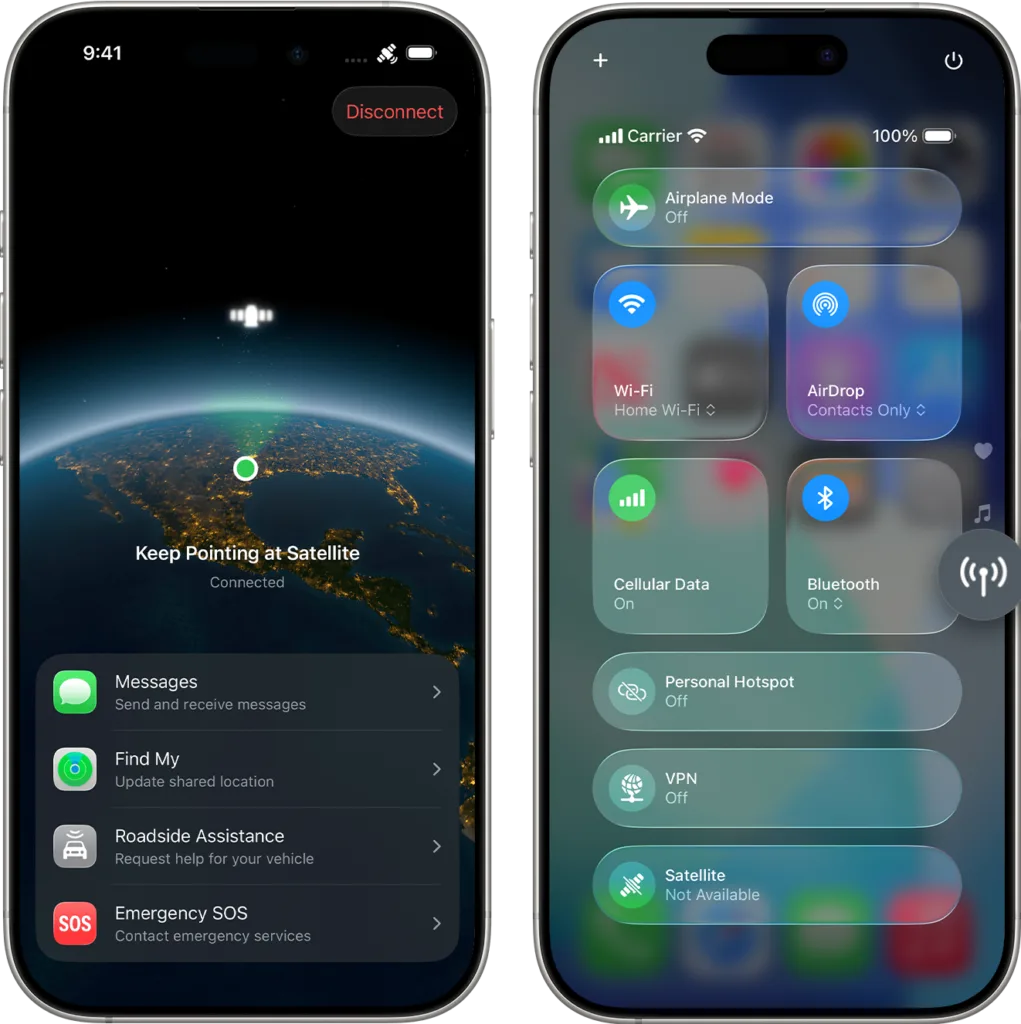
Your iPhone's Control Center view shows whether you have access to satellite services. | Image by Apple

Pro Tip
It's recommended to try the Satellite Connection Demo before you head out. You can find it in your settings under Apps > Messages > Satellite Connection Demo. It lets you practice locking onto a satellite without actually messaging emergency services.
The Future: Carrier-Provided Direct-to-Cell (Starlink)
While Apple’s Globalstar integration is fantastic, the mobile industry is currently undergoing a massive shift toward "Direct to Cell" technology. Instead of relying solely on Apple's built-in software, your actual mobile carrier can now beam coverage directly to your phone from space.
If your iPhone is running iOS 18 or later, it is fully compatible with carrier-provided satellite features. When your phone enters a dead zone but successfully connects to a carrier satellite network, you will see "SAT" displayed in your status bar.
A prime example is the recent rollout of T-Satellite, born from a partnership between T-Mobile and SpaceX's Starlink. The satellite internet company's Direct-to-Cell satellites act like orbiting cell towers. If you lose terrestrial signal, your phone automatically connects to Starlink.
Currently, T-Satellite supports SMS, WhatsApp messaging, and basic data for essential navigation apps like Google Maps and AllTrails. It's included automatically on T-Mobile’s top-tier Experience Beyond plan. For other T-Mobile users—and surprisingly, even compatible AT&T and Verizon customers with open eSIM slots—it can be purchased as a $10/month add-on.
If you're patiently waiting for your carrier to catch up, keep your eyes on AST SpaceMobile. This Texas-based startup is stepping up to the plate as Starlink's primary direct-to-cell rival, and it has already locked in major partnerships and funding from AT&T and Verizon.


 Your Privacy Choices